
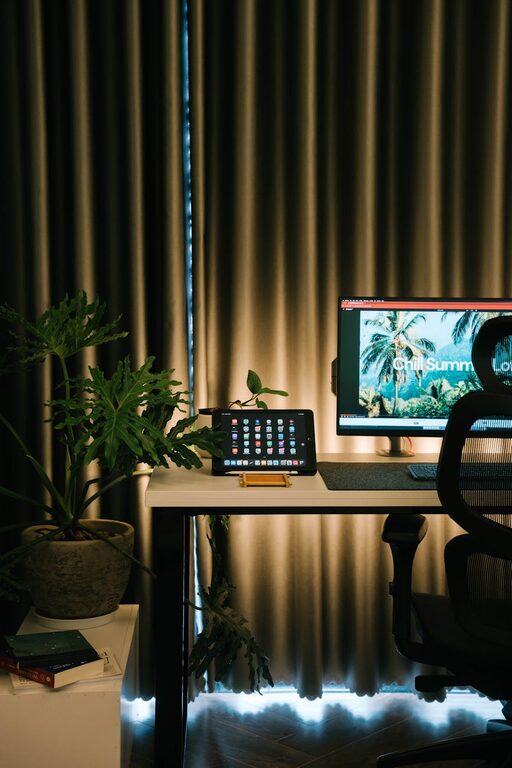
Creating a home workspace that feels cozy and inviting is essential for improving focus, comfort, and overall productivity. Whether you work remotely daily or need a dedicated spot for occasional tasks, making your workspace feel welcoming can positively impact your work experience. In this post, we’ll share practical tips to help you design a home workspace that combines functionality with comfort.
Choose the Right Location
Selecting the ideal spot for your home workspace is the first step toward creating a cozy and inviting area.
– Natural Light: Whenever possible, set up your workspace near a window. Natural light helps reduce eye strain and boosts mood.
– Quiet Space: Pick a location away from noisy areas, such as kitchens or high-traffic hallways, to minimize distractions.
– Privacy: If possible, choose a nook or corner that you can personalize to make the space feel like your own retreat.
Invest in Comfortable Furniture
Comfortable furniture is key to maintaining focus and preventing discomfort during long work hours.
– Ergonomic Chair: Choose a chair with good lumbar support and adjustable height. Comfort supports better posture and reduces fatigue.
– Desk Size: Select a desk that fits your space while providing enough surface area for your essentials like a computer, notepad, and accessories.
– Footrest: Consider a footrest to keep your legs comfortable and improve circulation if your feet don’t reach the floor naturally.
Personalize Your Space
Adding personal touches creates a welcoming environment that reflects your style and keeps you motivated.
– Artwork and Photos: Display pieces that inspire you, such as framed photos, artwork, or motivational quotes.
– Plants: Incorporate greenery into your workspace. Plants can improve air quality and add a calming touch to your setup.
– Decor: Use cozy textiles like a soft rug, cushions, or a throw blanket to make the space more inviting.
Organize and Declutter
An organized workspace reduces distractions and helps maintain focus throughout the day.
– Storage Solutions: Use shelves, drawers, or organizers to keep supplies and documents neatly stored.
– Minimalism: Keep only the essentials on your desk to avoid clutter. A tidy space feels calmer and more productive.
– Cable Management: Use clips or cable sleeves to keep cords and chargers orderly and out of the way.
Optimize Lighting
Good lighting is crucial for reducing eye strain and maintaining energy levels while working.
– Task Lighting: Use adjustable desk lamps with warm light to illuminate your workspace for focused tasks.
– Ambient Lighting: Complement natural light with soft ambient lighting to create a comfortable environment, especially during evenings.
– Avoid Glare: Position your computer screen and light sources to minimize glare, which can cause discomfort and headaches.
Incorporate Soothing Elements
Creating a relaxing atmosphere promotes focus and well-being during work hours.
– Aromatherapy: Use subtle scents like lavender or citrus through essential oils or candles to create a calming mood.
– Sound: Consider white noise machines, nature sounds, or soft background music to improve concentration.
– Comfort Items: Keep items like a warm mug for beverages or a hand lotion nearby to enhance comfort.
Set Boundaries
Defining clear work boundaries supports productivity and work-life balance.
– Dedicated Workspace: Avoid working from your bed or couch; having a specific area helps signal when it’s work time.
– Visual Cues: Use room dividers or screens if your workspace is shared or in an open area to create a sense of separation.
– Regular Breaks: Design spaces where you can stretch or take breaks comfortably to recharge during the day.
Keep Technology in Check
Ensure your devices and accessories support your work without causing clutter or distractions.
– Wireless Devices: Opt for wireless keyboards, mice, and headphones to keep the workspace neat.
– Tech Placement: Arrange your monitor and devices ergonomically to reduce strain on your eyes and neck.
– Charging Station: Set up an organized charging area for your phone, tablet, and other devices.
Final Thoughts
Designing a cozy and inviting home workspace is about balancing comfort, personalization, and practicality. By choosing the right spot, investing in quality furniture, and adding personal touches, you create an environment that encourages productivity while feeling pleasant to spend time in. Remember to keep your space organized, well-lit, and soothing so you can enjoy working from home to its fullest.